New Jersey Hospital Association's (NJHA) EMResource Tool
As of 11/01/2024 at 12 am, under New Jersey Executive Order (EO) 111 and Center for Medicaid and Medicare Services (CMS) Final Rule 42 C.F.R 482.42(e) and 485.640(d), the NJHA EMResource Tool for new submissions of respiratory data to the National Healthcare Safety Network (NHSN) system is the proper channel for submission of required respiratory data as outlined in NJ EO 111. For all assistance with new data submissions required for the 11/10/2024 - 11/12/2024 and future reporting periods, please utilize the rhcc@njha.com email address for assistance or the New Jersey Hospital Association (NJHA) EMResource Tool Assistance Form.
New Jersey Executive Order 111
Executive Order 111
Reporting Cadence
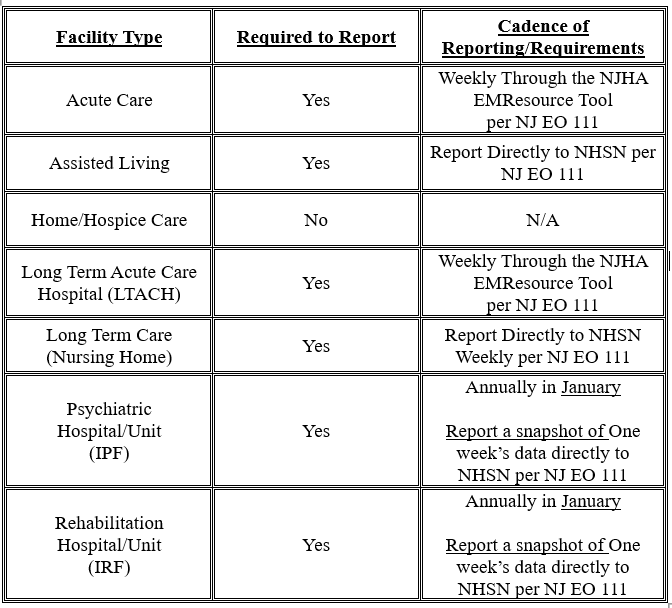
Please review the updated table below for further information on reporting requirements and cadence per the newest revision of NJ EO 111 from 11/5/2024.
Click graphic to open larger in new window
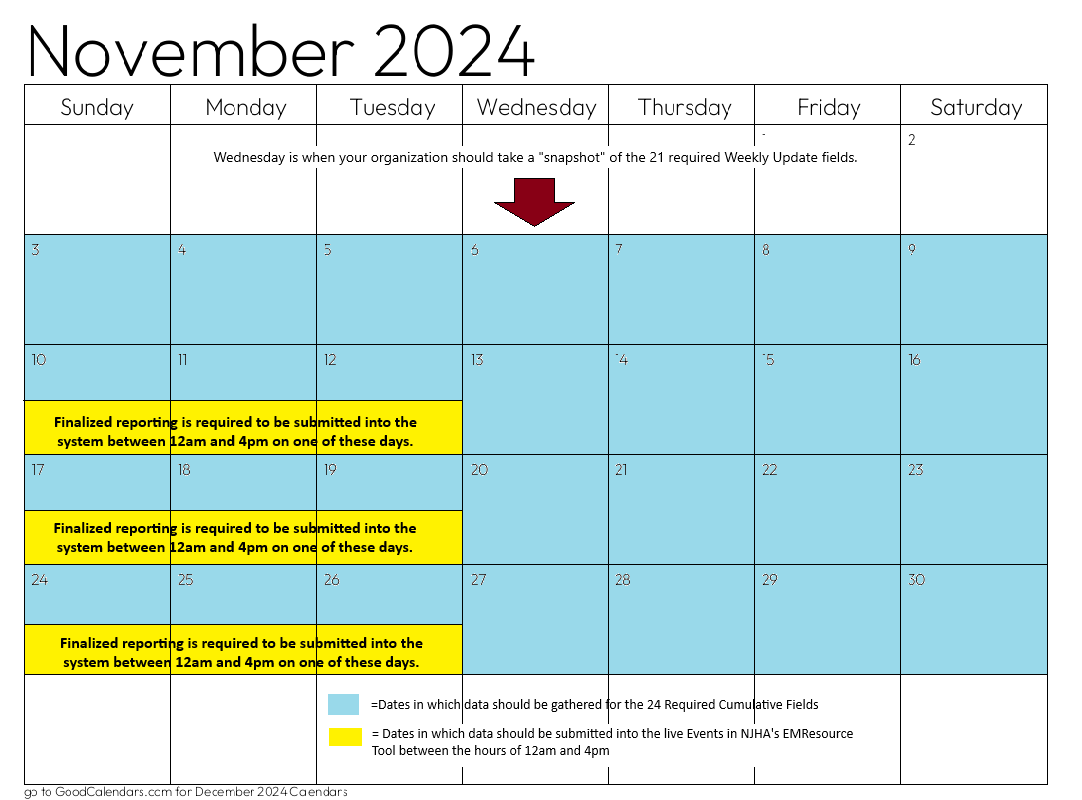
In addition, there is an update to reporting specific to the NJHA EMResource Tool. The new date of the first event to submit within the tool is now Sunday, 11/10/2024, at 12:00 AM. This event will run from Sunday 11/10/2024 at 12:00 AM until Tuesday, 11/12/2024 at 4:00 PM. The data submitted to ensure your compliance with CMS and EO 111 will need to be entered on one of the 3 days (11/10, 11/11, OR 11/12) between the hours of 12:00 AM and 4:00 PM. If your organization has not entered its data prior to 4:00 PM it should NOT submit its data that day. Rather, you should submit on the next day between the hours of 12:00 AM and 4:00 PM.
All data is required to be entered PRIOR to 4:00 PM on Tuesday, in order to ensure compliance with CMS and EO 111.
Click calendar to open larger in new window
Data Elements
When submitting data elements please keep in mind the following requirements as outlined by the CMS final rule:
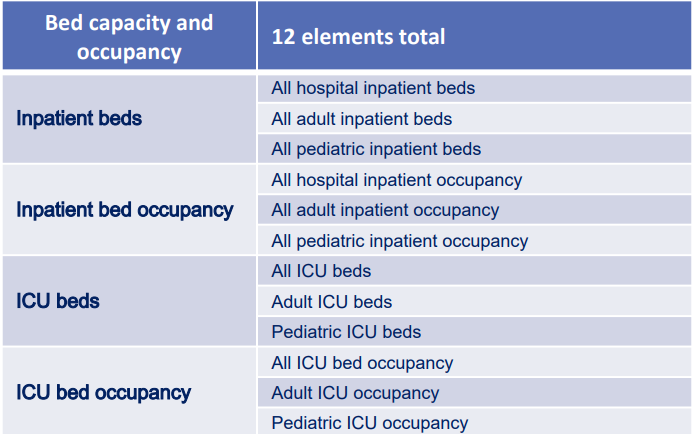
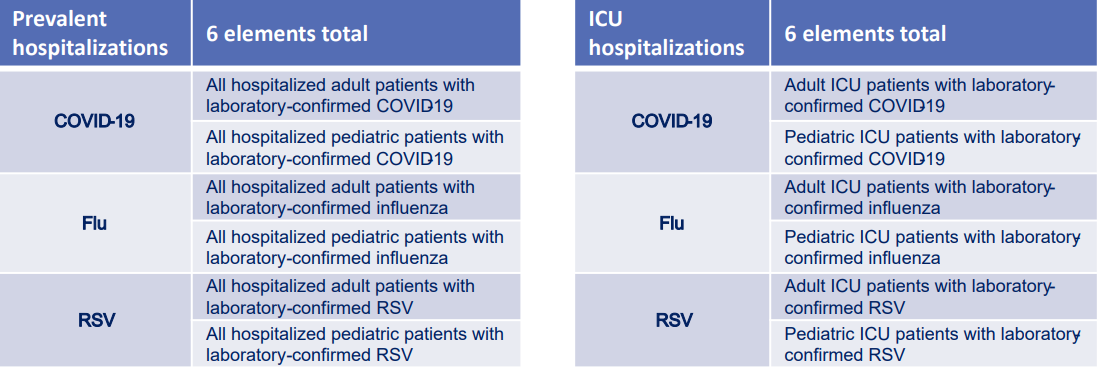
Of the 48 required data elements:
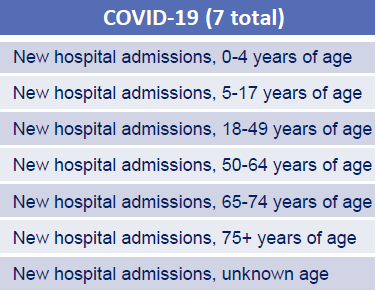
● 24 only need to be reported as a once a week snapshot of Wednesday's data which can be seen in the charts below:
Click charts to open larger in new window
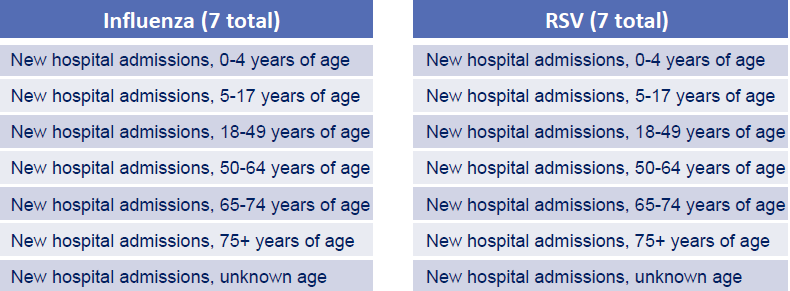
● 21 need to be reported as a cumulative number for the entire week (Sunday – Saturday)
Click charts to open larger in new window
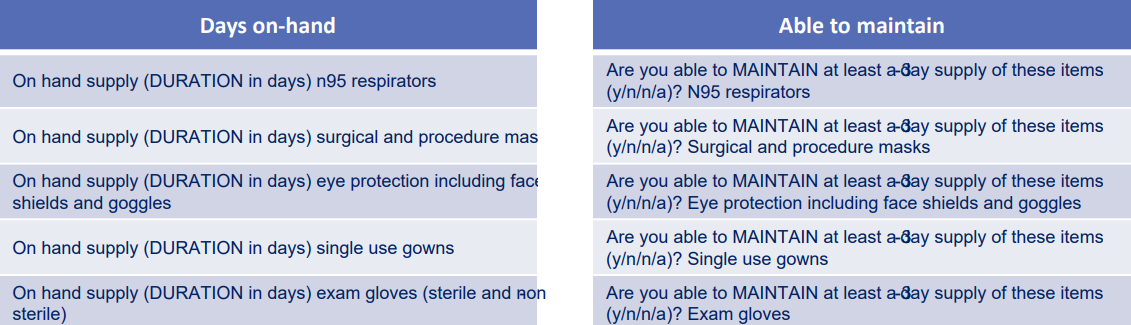
● The 10 supply and PPE fields will remain available for optional reporting (Seen Below)
If opting to report these fields, we recommend using the previous cadence of a once a week snapshot of Wednesdays.
Click charts to open larger in new window
Training Tools and Other Resources
FAQ
Check here for answers to common queries about using Juvare and its various solutions such as EMResource and eICS. If you don’t see what you’re looking for reach out to Juvare Support.
A: Verify that you are using the correct website link:
https://login.juvare.com. If you enter a login email and password combination that the system does not recognize, the system automatically returns you to the
Log In page. Double check the information you entered, and keep the following considerations in mind:
- Make sure Caps Lock is not turned on.
- Your browser must be configured to allow cookies from *.juvare.com while you are in EMResource.
- Your browser must be enabled to receive TLS and SSL.
If you are unable to connect, contact
emc@njha.com or
Juvare Support at
+1 (877) 771-0911.
A: The comment section is only for specific information about the Divert. It is to include any pertinent public viewable descriptive information such as patient volume, ongoing hazard, neuroscience, etc.
A: Divert times have a default expiration time between two and four hours depending on the Divert type. If your Divert is longer than four hours, you will need to start a new one. If your Divert is less than four hours, you can close it manually.
A: We’d recommend looking into our foundational and facility admin training videos which will be available for access soon. In the meantime, Juvare has several comprehensive multi-module training series
available here.
Request EMResource Access
To request access to EMResource, please visit our EMResource page.
EMResource is available to HCCs, hospitals, long-term care facilities, EMS agencies, first responders, public health, dispatch centers, emergency management directors and other healthcare partners.
Request eICS Access
To request access to eICS, please visit our eICS page
eICS is available to HCCs, hospitals and other healthcare partners that may be involved in an emergency response.